
Clear work schedules and shift planning
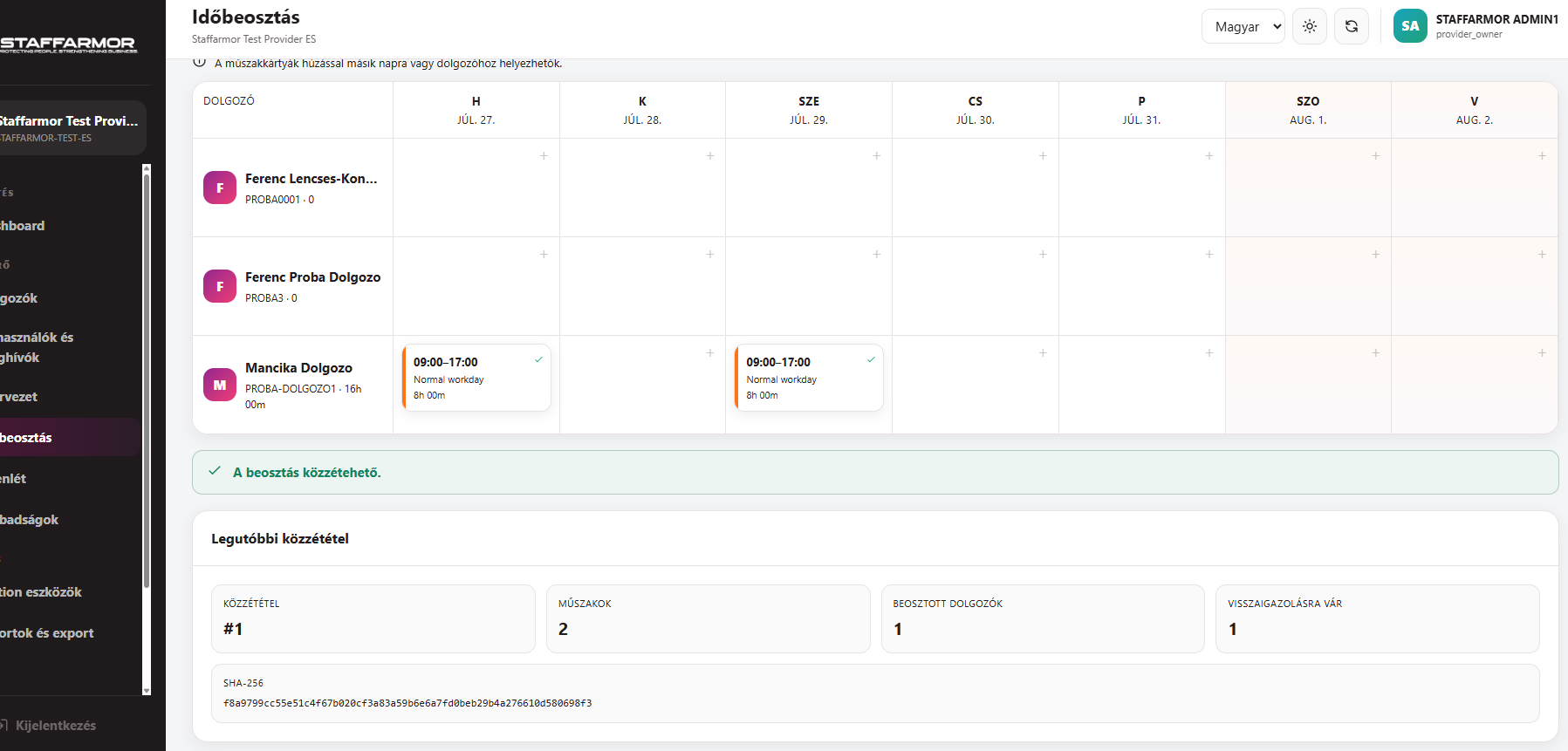
A useful work schedule is clear to both the manager and the team. Staffarmor’s weekly planner connects shifts with employees and sites.
Request a 15-day free trialHow does it work?
1. Choose employees and sites
Assign employees to planned work using your organisation’s records.
2. Plan weekly shifts
Review and create work schedules in the weekly planner.
3. Review conflicts and absences
Take account of flagged conflicts and leave displayed during scheduling.
4. Employee access
Employees can view their own schedules and the related shift acknowledgement in the employee interface.
Which teams can it help?
For teams working in shifts and businesses with several sites where coordinating schedules and absences is a regular task.
Available features and limits depend on your selected plan. Plans and pricing
Watch the Admin video introductionThe video has Hungarian narration.
Frequently asked questions
Can employees see their own schedules?
Yes. Employees can access their own schedules through the mobile employee interface.
Is leave shown during planning?
Staffarmor marks leave to assist weekly planning. Handling leave requests is a separate, connected workflow.
Where can I see the planner?
Explore the screenshots page and the Hungarian-language Admin video introduction.
How can I request the 15-day free trial?
Indicate that you would like a trial in the quote request form. Our team will contact you to arrange activation. No bank card details are required. A paid subscription can be chosen after the trial.